Papa Johns Pizza & Delivery
- 4.8
- Rating
- 10.00M
- Installs
- Free
- Price

 Analysis by App-foxy
If you are hungry and want to order Papa John’s without calling a store, the Papa Johns Pizza app is built for that exact moment. I found it most useful when I already knew I wanted pizza and needed a quick way to choose items, enter delivery details, and complete an order from my phone. It is a free Food & Drink app from Papa John's Pizza, available for Everyone, and it has been around long enough to feel like a mature ordering tool rather than a short-lived experiment.
The important thing to understand before installing it is that this is a direct ordering app, not a general restaurant-discovery service. You are not opening it to compare every pizza place nearby. You are opening it to order from Papa John’s, whether you want delivery or plan to pick up the food yourself. That focused approach is its biggest strength, but it also defines who should use it and who may be better served by a broader delivery app.
What the first order feels like
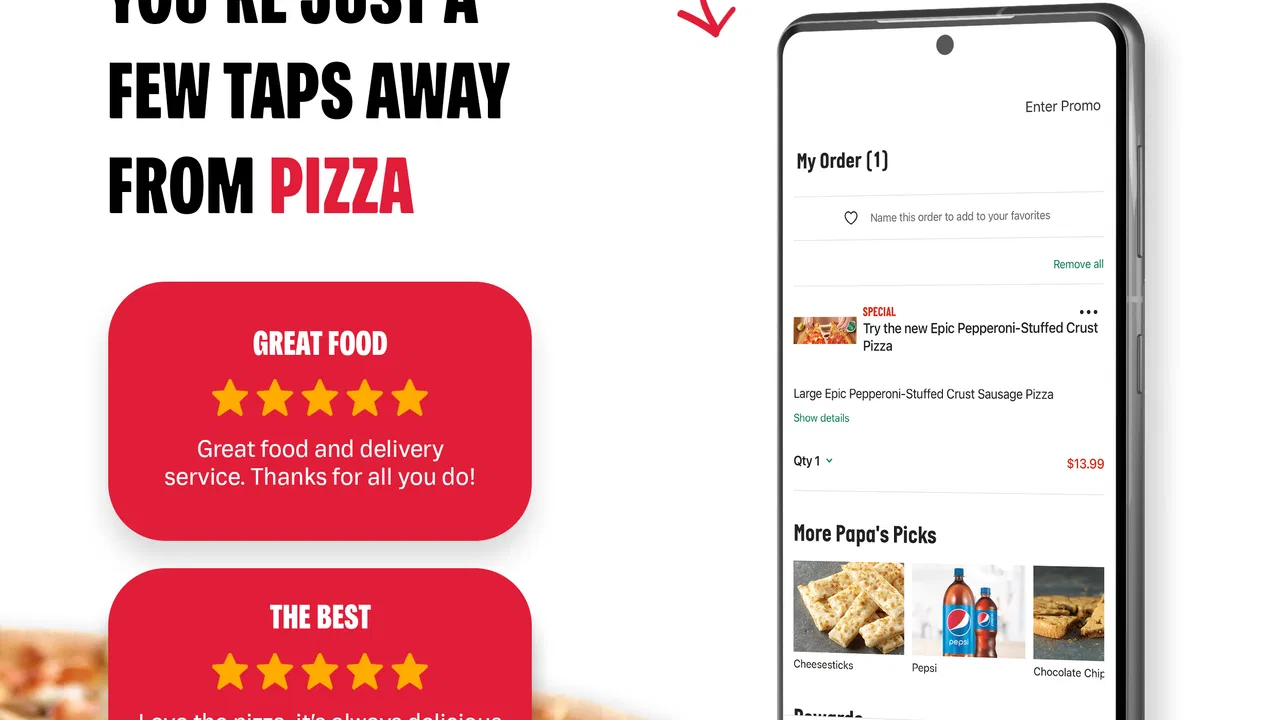
On my first run, I approached it as I would on a busy evening: I wanted to get through the menu without second-guessing every step. The app’s purpose is clear from the beginning, and the store summary describes it as an Android pizza-ordering experience. In practical terms, that means the useful path is straightforward: identify where the order should go, browse the available food, customize what you want, review the basket, and submit it.
You May Also Like

 AccuWeather: Weather Radar
AccuWeather Review: A Quick, Clear Forecast for Everyday Decisions
For everyday plans, the best forecast is the one you can understand quickly. AccuWeather makes rain timing, radar, and local conditions easy to act on, with a few trade-offs.

 Hill Climb Racing
Why Hill Climb Racing Still Turns Crashes Into One More Run
A tiny car, a bumpy hill and one more upgrade: Hill Climb Racing keeps resurfacing because its simple chaos makes every near-miss feel personal.

 AliExpress - Shopping App
AliExpress Makes Global Shopping Feel Personal, but Shoppers Bear the Risk
AliExpress turns a global marketplace into a pocket-sized discovery engine. Its reach is useful, its shopping loop compelling, and its trade-offs easy to miss.

 Lords Mobile: Kingdom Wars
Lords Mobile Is a Kingdom-Building Routine, Not a Quick Match
A case-by-case verdict on the building, battles, device demands, and social commitments that make Lords Mobile rewarding for some players and exhausting for others.

 PDF Scanner app - TapScanner
TapScanner Makes Paperwork Easier to Capture, Check, and Share
TapScanner makes scanning with a phone feel less like a rescue operation and more like a dependable step in getting work done. Its capture tools are useful, though not flawless.

 Block Blast!
 Shows How Much a Puzzle Game Can Leave Out
A quiet grid game shows why puzzle players increasingly value instant clarity, repeatable skill and low-pressure play—and where the genre still needs to catch up.
More From Our News Desk
View All News


I would recommend having your address and your preferred order in mind before you start. That small bit of preparation makes the experience calmer, especially if you are ordering for several people. A group order can become confusing when everyone is changing toppings at the same time, so I found it better to decide the pizza sizes, sides, and drinks first, then use the app as the final place to assemble everything.
The interface is aimed at reducing the need for a phone conversation. That is valuable if you dislike repeating an address, explaining toppings aloud, or trying to hear a staff member in a noisy room. It also gives you a chance to look over your choices before committing. I consider that review step one of the app’s real benefits, because a written basket is easier to inspect than a rushed verbal order.
At the same time, the app is not a substitute for knowing what you want. If you are still deciding between several restaurants, comparing delivery charges, or searching for a particular cuisine, a multi-restaurant service may be more convenient. This app is strongest after the restaurant decision has already been made.
Who will get the most from it
I think it suits regular Papa John’s customers, families ordering from home, and anyone who prefers tapping through an order instead of making a call. It is also useful when you are ordering from a place where speaking on the phone would be awkward, such as a shared office or a quiet room. Because the app is free, there is no separate purchase required just to try the ordering process.
It is less compelling for someone who only wants to discover nearby deals across different brands. It may also be the wrong first choice if your main concern is comparing several delivery services at once. In those situations, the broader marketplace is the better tool, even if the direct app can feel cleaner once you have chosen Papa John’s.
Getting ready before you tap through the menu
The app has a long history on Android, with a release date of December 19, 2011, and the current version is 5.22.0. Its minimum operating-system requirement is Android 7.0. That makes it accessible to many older Android phones, although I would still keep the operating system and the app updated when possible. A current version generally gives you the best chance of avoiding interface differences or outdated behavior.
For a first-time user, the most useful preparation is not technical. Decide whether you want delivery or pickup, check that the address is written correctly, and know whether you are ordering one personal meal or feeding a group. If you are ordering for children or guests, write down the customizations before opening the app. This prevents the common mistake of adding a pizza and then forgetting which person wanted which change.
I also suggest treating the basket as a checklist rather than a final formality. Look at the selected items, sizes, toppings, sides, and quantities before you place the order. That habit is more reliable than assuming the app will infer what you meant from a quick series of taps.
From installation to a meaningful first success
I’ll focus this section on making the first order feel manageable rather than trying to explore every menu option at once. Starting with the delivery or pickup choice and a familiar item gives me a clear way to learn the app’s flow, while leaving the next section to explain how to make that first attempt count.
Step one: choose the ordering situation
After installing, start by thinking about the destination rather than the food. Delivery and pickup are different experiences, and entering the wrong kind of order can create unnecessary friction later. If you are at home, use the address where you actually want the meal delivered. If you are at work, be precise about the location and make sure someone will be available to receive it.
This is one of the places where a direct restaurant app can be more reassuring than a phone call: you can pause and inspect the information. I prefer to slow down for a few seconds here rather than rush into the menu and discover later that the order was built for the wrong location.
Step two: build one item carefully
For your first meaningful test, do not begin with a complicated group order. Add one pizza or meal that you understand well, then inspect its options. This gives you a chance to learn how the app presents customization without creating a large basket that is difficult to correct.
My practical tip is to read each customization screen from top to bottom. Do not assume that a familiar pizza name automatically includes every topping or side you expect. The app is an ordering interface, so the final result depends on the choices you confirm. If you are particular about toppings, use the visible selections as your source of truth instead of relying on memory from a previous order.
Once the first item looks right, add anything else the group actually needs. I would avoid adding extras simply because they are visible. The direct ordering experience becomes much clearer when every item in the basket has a reason to be there.
Step three: review before submitting
The review stage is where I think the app earns its place on a regular customer’s phone. A basket lets you catch mismatched quantities, duplicate items, or a customization that was left unchanged. It is especially helpful when ordering for several people, because you can check the complete meal in one place instead of trying to remember what you said during a call.
Before completing the order, I would verify four things in this order: the destination, the order type, the contents of the basket, and the contact or payment details requested by the checkout flow. This sequence is simple, but it prevents the most expensive kind of mistake: submitting a perfectly built order to the wrong place.
After that, the first successful action is not merely opening the menu. It is completing a small, accurate order that you can understand from beginning to end. Once you have done that, later orders become much faster because you already know where the important decisions appear.
Step four: use the app as an order record
After placing an order, keep the confirmation information available until the food arrives or you collect it. I would not close the app immediately if I were ordering for a time-sensitive event, because the order details are useful for checking what was requested. This is particularly valuable when several pizzas look similar but have different toppings.
For a family movie night, for example, I would build the order while everyone is choosing what they want, review each item aloud, and then use the final basket as the agreed list. That workflow reduces the “I thought mine had…” problem that often happens with shared meals. The app does not replace communication among the group, but it gives everyone a concrete order to inspect before submission.
What can be confusing the first time
The biggest potential confusion is expecting the app to behave like a universal delivery marketplace. It is centered on Papa John’s, so its value depends on wanting that restaurant. If you open it hoping to compare independent local pizzerias, you may feel limited even though the app is doing exactly what it was designed to do.
Another point of friction is customization. Pizza orders can contain several layers of decisions, and a quick tap can leave an item different from what you intended. I recommend checking the item summary after every major change rather than waiting until the end and trying to reconstruct your choices from memory.
Delivery and pickup can also create different expectations. If you are collecting the order, think about when you can realistically arrive. If you are requesting delivery, make sure the destination is somewhere the driver can identify easily. These are ordinary ordering details, but the app cannot solve an unclear address or an unavailable recipient.
My strongest first-order tip is to keep the basket small, verify it twice, and only then attempt a larger family order. That approach teaches you the app’s rhythm without turning your first experience into a complicated project.
Where it compares well with alternatives
Compared with calling the restaurant, the app gives me more control over reading and correcting the order. I do not have to rely on remembering every spoken detail, and I can take a moment before submitting. For repeat orders, that visual process is usually more comfortable than starting from zero on the phone.
Compared with a broad delivery marketplace, the direct app is more focused. The marketplace may be better for comparing restaurants, fees, and cuisines in one place. The Papa John’s app is better when I have already chosen the brand and want a direct route to its menu. Neither option wins every situation; the right choice depends on whether discovery or direct ordering is the task.
The app also has a practical advantage for people who want the restaurant’s own ordering path rather than an intermediary. That does not automatically make it faster in every circumstance, but it removes the extra layer of browsing unrelated restaurants. If your decision is already made, that narrower scope can feel efficient.
Small habits that make repeat orders easier
For repeat use, I would create a personal checklist outside the app the first time: the usual pizza choice, the toppings that need changing, the number of people eating, and whether pickup or delivery makes sense. Then I would use the app to verify those details rather than trusting an old routine. This is a simple way to avoid ordering the wrong version of a familiar meal.
When ordering for a group, add items one at a time and pause after each person’s request. Naming the item mentally by its recipient—such as “the plain one” or “the extra-topping one”—makes the final review easier. This is a small workflow improvement, but it matters more than trying to navigate quickly.
If the app feels slower than expected, check whether the problem is actually decision overload. A large menu and many customizations can make any ordering tool feel busy. Reducing the order to the essentials, checking the basket, and returning later for extras is often more effective than tapping rapidly through every option.
How the app fits different users
For a first-time customer, I would use it for a modest order and focus on learning the delivery or pickup flow. For a regular customer, the main benefit is consistency: the same direct route is available whenever you already know what you want. For a family, the basket review is more important than speed because it gives everyone a chance to catch mistakes.
For someone with very specific dietary needs, I would be more cautious. The app can present ordering choices, but I would not treat a customization screen as a guarantee about preparation conditions. If your needs require a detailed conversation with the restaurant, calling may be the more appropriate option.
For a person using an older Android phone, the minimum requirement of Android 7.0 is useful to know. The app is not restricted to only the newest devices, although the overall experience will still depend on the phone itself and its software condition.
What its popularity tells me
The app has an average rating of 4.8 from around 302 thousand ratings, with roughly 72 thousand written reviews, and it has passed 10 million installs. Those figures suggest that many people find the ordering experience dependable enough to keep using. I would still treat popularity as context rather than a promise that every order will be effortless, because the quality of an individual experience can depend on the selected store, the address, and the order itself.
Its Everyone content rating also makes it a straightforward choice for a household device. The app is free to install, so trying the menu and ordering flow does not require an upfront app purchase. The meaningful cost is the food order itself, not access to the software.
When I would choose something else
I would skip this app when I was still comparing several restaurants or when I needed a marketplace’s broader view of local delivery options. I would also consider another route if I wanted to discuss a complicated request in detail before ordering. A phone call can be slower, but it allows questions that a structured menu may not answer clearly.
I would not recommend installing it solely because you want a general food-ordering app. Its usefulness is tied to Papa John’s. That focused purpose is not a flaw, but it is an important trade-off for first-time users who may expect a wider selection.
My next-step recommendation
My advice is to install it when you already have a realistic Papa John’s order in mind, not merely when you are browsing for dinner inspiration. Start with one familiar item, choose delivery or pickup carefully, and use the basket as a final checklist. Once that first order goes smoothly, the app becomes much more practical for busy evenings and repeat meals.
For me, the best reason to keep it installed is the direct, readable ordering workflow. It does not try to be every food app at once, and that makes it easier to understand when I want Papa John’s specifically. The trade-off is that it cannot replace a multi-restaurant marketplace or a personal conversation for every unusual request.
Overall, I would recommend Papa Johns Pizza to anyone who regularly orders from the brand and wants a simple phone-based alternative to calling. The free app, broad Android compatibility, strong user response, and focused menu make it a sensible first stop for a normal pizza order. Just approach the first checkout deliberately: confirm the location, inspect every customization, and review the complete basket before submitting. That small amount of care turns the app from a menu browser into a dependable part of an everyday dinner routine.
FAQs for Papa Johns Pizza & Delivery
01What features does the Papa Johns Pizza & Delivery app offer?
The Papa Johns Pizza & Delivery app offers a user-friendly interface to easily browse the menu, customize orders, and access exclusive deals. It also provides a seamless ordering experience with quick checkout options, real-time order tracking, and multiple payment methods. Users can set favorite orders for quick reordering and locate nearby stores.
02How can I track my order using the app?
Once you've placed your order through the Papa Johns app, you can track its progress in real-time. The app provides updates on the status of your order, from preparation to delivery. Simply navigate to the order history section to view the current status and estimated delivery time.
03Are there any exclusive deals or discounts available through the app?
Yes, the Papa Johns Pizza & Delivery app frequently offers exclusive deals and discounts to app users. By enabling notifications, users can receive alerts on the latest promotions, special offers, and limited-time discounts. This makes it easy to save money while enjoying your favorite pizzas.
04Is the app available for both Android and iOS devices?
The Papa Johns Pizza & Delivery app is available for both Android and iOS platforms. You can download it from the Google Play Store for Android devices or the Apple App Store for iOS devices. This ensures a wide range of compatibility with various smartphones and tablets.
05What payment methods are supported by the app?
The Papa Johns app supports multiple payment methods to ensure convenience. You can pay using credit/debit cards or opt for digital wallets like PayPal. Additionally, some locations may offer cash on delivery. It's advisable to check the available payment options at checkout for your specific location.
Pros
- Easy-to-use interface for quick ordering.
- Customizable pizza options to suit tastes.
- Real-time tracking of delivery progress.
- Loyalty rewards program for frequent users.
- Secure payment methods available.
Cons
- Limited customization for dietary needs.
- App notifications can be frequent.
- Occasional delivery delays reported.
- Requires account sign-up for full features.
- Some features require stable internet.

Papa Johns Pizza & Delivery
Gallery